
Prepare and Upload Your Graphic Files
Artwork Uploads
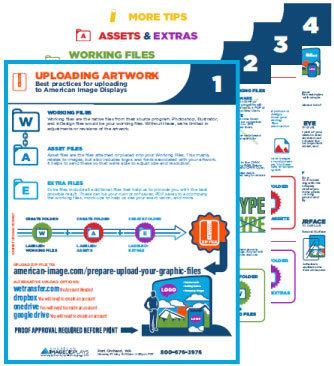
Check out our brand new Artwork Infographic PDF! This reference can help to ensure that your graphics turn out the best every time. It walks you through the steps to Uploading your artwork, preparing your Working Files, adding any Assets & Extras, and gives Additional Tips on industry best practices.
Click here to download your copy!
Please do not upload files with names containing characters such as / | * # & as this can cause file corruption issues.
Please Review Instructions Prior to Uploading Files.
When you're ready to upload files, please fill out the form below and select or drag & drop your files. Be sure to include all the information we need, especially your instructions and your complete contact information.
If you can, please zip/stuff everything into one file. If for some reason you encounter an error, leave us a message using the box on the bottom right, or give us a call.
View Detailed Graphic Frequently Asked Questions
Software we DO NOT accept files from
These programs are not 100% compatible with our form of large scale printing.
- Adobe ACROBAT PDF, Adobe PageMaker
- Macromedia Freehand
- Corel DRAW
- QuarkXPress
- GIMP native files (flatten and save as TIF only)
- Microsoft Word, Microsoft PhotoDraw, Microsoft PowerPoint, Microsoft Excel, Microsoft Publisher
If you have your artwork in one of the programs listed that we do not accept, please contact the Graphics Department for options.
Quick Graphics FAQ
- HIGH Resolution PDF's are now preferred for most requirements
- If you need us to edit your file to make any corrections, please send NATIVE FILES from Adobe Illustrator, Photoshop, or InDesign.
- Convert all fonts to Outlines (Illustrator and InDesign), or Rasterize them (Photoshop).
- This includes any linked images/document used inside your layouts (ie: vector Illustrator logos linked into InDesign).
- If working in Adobe InDesign, DO NOT send files that use text frame anchor boxes as placement holders for copy that has been converted to outlines.
- This results in font errors and your file will be rejected. You must supply a file that contains no text or font objects at all.
- Please provide a 2" bleed on all layouts unless otherwise noted on your product template. If no template is located online, please call and one will be provided.
- DO NOT embed your raster images into your layout program (ie: Illustrator). Please "link" these images using the appropriate procedure according to your software.
- Include any linked or placed files with your uploaded documents.
- Do not place .EPS raster images in your layout program.
- Save .EPS raster images as Level 12 JPG images or TIF/PSD files before placing them into your layout program.
- Resolution at 100% should be 100 ppi/dpi for raster images.
- CMYK color spaces are required but leave Pantone fills inside your files rather than converting to CMYK.
- Include a preview low resolution JPG of your layout with PMS #'s called out if color is critical.
- File too big? See these tips.
- Call if you have any further questions.
Color Matching
Include reference numbers for Pantone Solid Coated colors or a printed sample of color desired. Pantone Solid Coated colors are the recommended palette to use when preparing color critical files. If color is critical please note as such on your order.
Note: Colors in Large Format Printing vary slightly from 4 color offset printing. If you wish to have a CMYK match performed, you must supply us with a printed color swatch to work from. Otherwise, please use Pantones.
Mixing custom colors with transparent objects or altering the opacity of colors while overlaying on top of other colored items in your layout program may produce undesireable results in large format printing.
Software Specifics
Adobe Illustrator / InDesign:
Whenever possible, it is recommended you avoid the raster filters directly inside Illustrator and InDesign. Rather, you should create your raster effects in Photoshop and then place either a PSD or a JPG of the completed file into your layout as a linked image.
Always save Illustrator/InDesign files in their native format. Do not send files as EPS or PDF.
NEVER scale raster images (ie: tif, psd, jpg) inside Illustrator/InDesign. Always pre-set the size in Photoshop first before placing it inside an Illustrator document.
When saving Illustrator files, be sure to turn off the "PDF Compatibility" and the "Include Linked Files" features during the "Save As" procedure. This will minimize the file size substantially. For an instruction sheet on these steps, view our Illustrator file preparation guide.
Adobe Photoshop:
If you are requesting a specific element to be color matched in a Photoshop raster file, please send the layered Photoshop file along with that color element on a separate layer (be sure all fonts are rasterized). Otherwise, please send a flattened Photoshop file. Please note that requesting a Pantone or CMYK color match from a Photoshop file may not be an option available depending on your product choice.
If you are requesting a specific element to be color matched in a Photoshop raster file, please send the layered Photoshop file along with that color element on a separate layer (be sure all fonts are rasterized). Otherwise, please send a flattened Photoshop file. Please note that requesting a Pantone or CMYK color match from a Photoshop file may not be an option available depending on your product choice.
"Raster" and "Vector" images? Why do we care?
It's often necessary to change an image's size to that it will fit onto that banner or backwall or sign that you'd like it printed on. But this only produces a good result with the right kind of art file - a vector file.
In fact, changing the size of a file is a simple way to determine whether it is raster or vector. The image is most likely a raster file if it blurs or becomes pixelated. The resolution of vector picture files is not affected by resizing them, so vectors may be infinitely resized, scaled, and reshaped without sacrificing image quality.
Raster (or bitmap) images are made up of tiny colored dots or pixels, arranged in a specific way to reproduce an image. These work very well with complex colors and are the best way to display a high resolution photograph. However, if you change the size of a raster image - if you make it larger - it will become pixelated and blurry.
Vector images are made with mathematical formulas that define lines and geometric shapes. If you change the size of a vector image, it will remain smooth and un-pixelated.
If we need to change the size of your images and artwork to better fit into the display template, then vector files will provide the best quality result.
For an in-depth discussion of raster vs vector, see this blog post.